 01
WhatsApp Cloud API
Connect multiple WhatsApp business numbers and switch between their inboxes. Manage API connections and webhook settings from your workspace.
Multiple numbers. One place to work.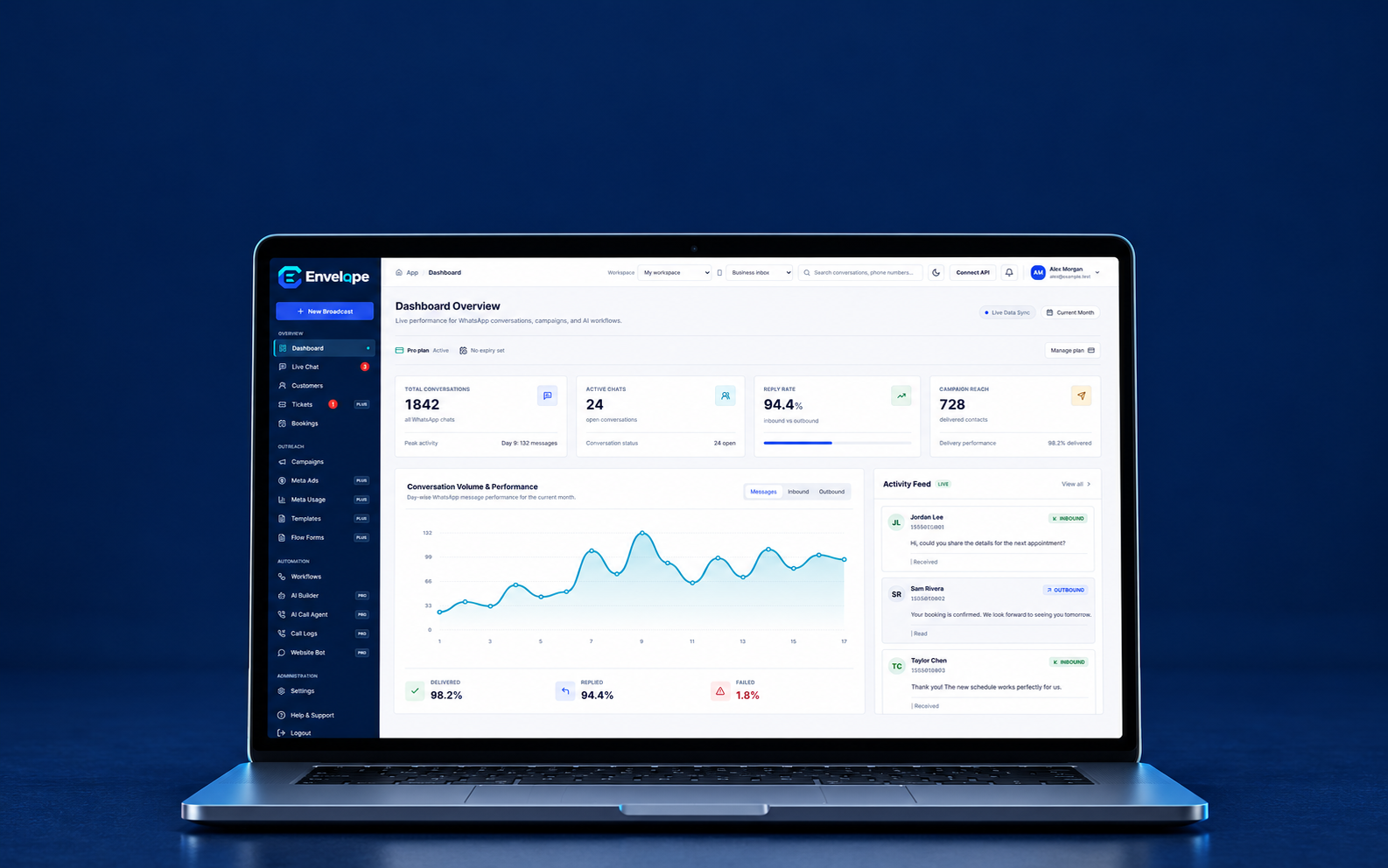
One workspace. Every customer touchpoint.
Conversations become connections.
Bring WhatsApp, marketing, customer management and AI together.
Inside your workspace
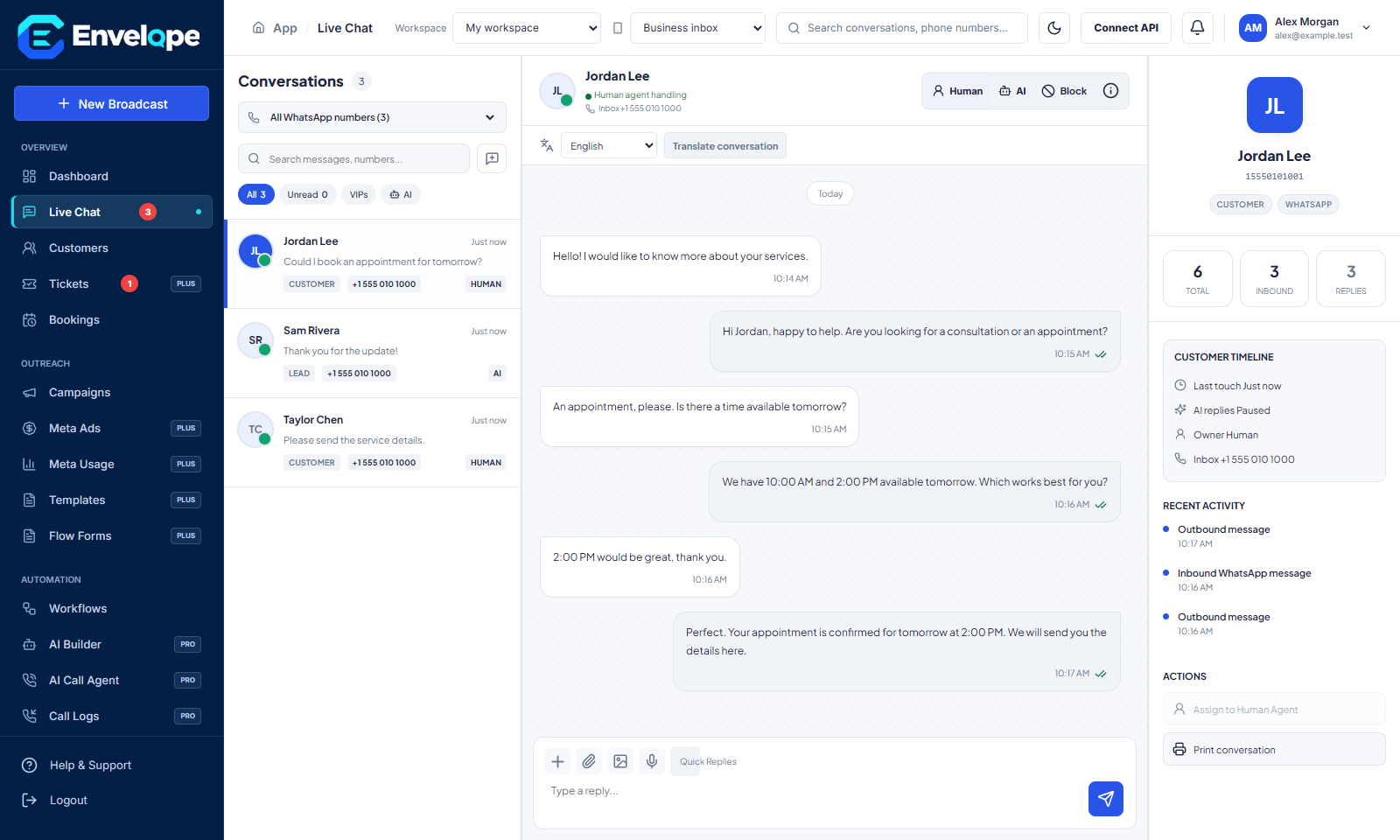
Keep the customer, the conversation and the next action together. Explore the actual Envelope Connect interface.
The complete platform
Start with the essentials. Add campaigns, forms, AI and voice as your business grows. Every capability has its place in one workspace.
Showing all 18 features
Make every conversation part of a lasting customer relationship.
01Connect multiple WhatsApp business numbers and switch between their inboxes. Manage API connections and webhook settings from your workspace.
Multiple numbers. One place to work. 02
Connect an eligible existing WhatsApp Business app number through Meta Embedded Signup while retaining access to the phone app.
Subject to Meta eligibility and onboarding. 03
Search conversations, exchange text and media, see message delivery status and view customer details. Move between AI handling and a human agent.
Customer context stays with the conversation. 04
Edit contacts, company details, tags and custom attributes. Import CSV contacts, organize customer segments and build audience batches.
Organized contacts. More relevant outreach. 05
Keep customer issues visible in a dedicated support queue. Search ticket records, review the details and update their status as your team works.
A clear record from issue to resolution. 06
Manage customer appointments, review booking details and track status. Keep appointment records alongside the rest of your customer operations.
Turn conversations into appointments.From the right audience to a clear view of the results.
 07
Select audience batches or custom numbers, personalize approved templates with variables and schedule delivery. Track recipients and message outcomes.
Draft, schedule, send and measure. 08
Create text, image, video and document templates with variables and buttons. Build image carousels and Flow templates, then sync approval status with Meta.
Marketing, Utility and Authentication. 09
Create, edit and publish structured forms within WhatsApp. Synchronize forms with Meta and use published forms in templates and supported workflows.
Collect information inside the conversation. 10
Connect authorized ad accounts, create campaigns and ads, preview creatives and change campaign status. Review spend, reach, impressions, clicks and CTR.
Requires the relevant Meta access and permissions. 11
Understand delivered-message volume by Meta pricing category. Review daily classifications and pricing breakdowns for your connected number.
Visibility into messaging usage. 12
See conversation volume, active chats, reply rate and campaign reach. Explore daily message trends, delivery performance and the recent activity feed.
A shared view of what is happening.Handle the routine. Keep people in control of what matters.
 13
Trigger replies from keywords or a customer's first message. Send text, approved templates or forms, and connect supported form submissions to external APIs.
Defined triggers. Consistent next steps. 14
Configure instructions, knowledge notes and structured service or pricing rules. Choose permitted tools, set handoff keywords and test your agent in a sandbox.
Your knowledge. Your operating rules. 15
Connect an MCP server as an external AI tool gateway. Select the tools each agent can use, with credentials and access configured for your workspace.
Give agents tools, with defined boundaries. 16
Embed an AI chat widget on your website. Capture visitor details, review website conversations and let a human teammate take over and reply.
Extend customer support beyond WhatsApp. 17
Configure incoming and outbound telephone calls through Plivo. Choose a voice and agent instructions, and call customers with the required consent.
Telephone calling, not native WhatsApp calls. 18
Review incoming and outgoing AI call history, status and saved transcripts. Play back call recordings when capture is enabled and consent is in place.
A record of the conversation after the call.
Try another search or show all features.
Connected by design
Put the right context, content and tools behind every response. Automate the next step without losing the human connection.
01 / ConnectConnect your WhatsApp number and authorize the business assets your workspace needs.
02 / UnderstandBring customer records, conversation history, tags and segments into the same context.
03 / RespondUse your team, a defined workflow or an AI agent with the tools you have allowed.
 04 / Continue
Hand off when needed, track outcomes and keep the next conversation informed.
Your phone app can stay part of the picture. Eligible WhatsApp Business app numbers can use Coexistence. Availability and onboarding are determined by Meta.
Connection FAQs
Room to grow
Choose the level that fits your team. Contact us for current pricing, onboarding and the integrations your business needs.
The essentials for a hands-on team.
More ways to engage and measure.
Bring intelligence into the workflow.
Feature availability depends on your plan, user role and configured integrations. Meta, AI-provider and telephone usage charges may apply separately. Onboarding, permissions and recording consent requirements still apply.
Roles for your teamSeparate administrator and team access, with features controlled by role and plan.
 Separate client workspaces
Keep each business's customers, authorized numbers and operating context in its own workspace.
 Business-authorized connections
Connect assets through the relevant business permissions, with explicit AI tool and handoff controls.

For an eligible existing WhatsApp Business app number, Coexistence can connect the phone app and Cloud API. Meta determines availability and eligibility during onboarding. It is not a guarantee for every number, and you should not delete an existing phone-app account just to try this connection.
No. Go covers core communication and workflows. Plus adds capabilities such as templates, forms, tickets and Meta reporting. Pro adds AI agents, website chat and telephone calling. Availability also depends on your user role, permissions and service configuration.
Yes. An authorized business user must connect the appropriate ad accounts and grant the relevant permissions. Meta's app access, account policies and review requirements apply. A WhatsApp connection does not automatically authorize ad management.
No. The AI Call Agent uses telephone calling through Plivo. Provider credentials, a configured telephone number and the required customer consent are needed. Call capture, transcripts and recordings depend on your configuration and applicable consent requirements.
Yes. WhatsApp conversations can move between AI and human handling. You can configure handoff keywords and define the tools an agent may use. The website chatbot also has a conversation inbox for human replies.
Envelope Connect includes user and role management, isolated workspaces, plan and billing controls, integration settings, browser notifications, light and dark modes, and an installable web app. Access depends on your role and plan.
Let's make the connection
Tell us about your team, your numbers and what you want to connect.
